Exporting
This page covers the export formats (PES, DST), choosing a hoop size, the preflight checks, and getting the file onto your machine.
When the design is ready, click Export in the top bar (or press Cmd+E). You'll need to be signed in — anonymous sessions can design freely, but exporting prompts you to create an account first.
Formats
bisect currently exports two stitch formats. Both have been verified on real machines, which is why the list is deliberately short.
| Format | Good for | Notes |
|---|---|---|
| PES | Brother, Babylock, and many home machines | Brother's native format. Carries thread color names so the machine prompts you for the right colour at each change. This is the default. |
| DST | Tajima and nearly every commercial/industrial machine | The universal Tajima format. If your machine isn't a Brother — or you're not sure what it takes — DST is the safe choice. DST carries no colour names, just stitches and stops. |
When you click Export, the save dialog lets you pick PES or DST from the file-type pulldown. PES is selected by default; switch to DST if your machine needs it.
Which one for my machine? Brother / Babylock → PES. Anything else, or unknown → DST. DST is understood by the widest range of machines.
Other formats (JEF for Janome, VP3 for Husqvarna/Pfaff, EXP for Melco/Bernina) are not yet available — they're planned for once each is verified on hardware. For now, most machines that don't read PES will happily read DST.
Hoop size
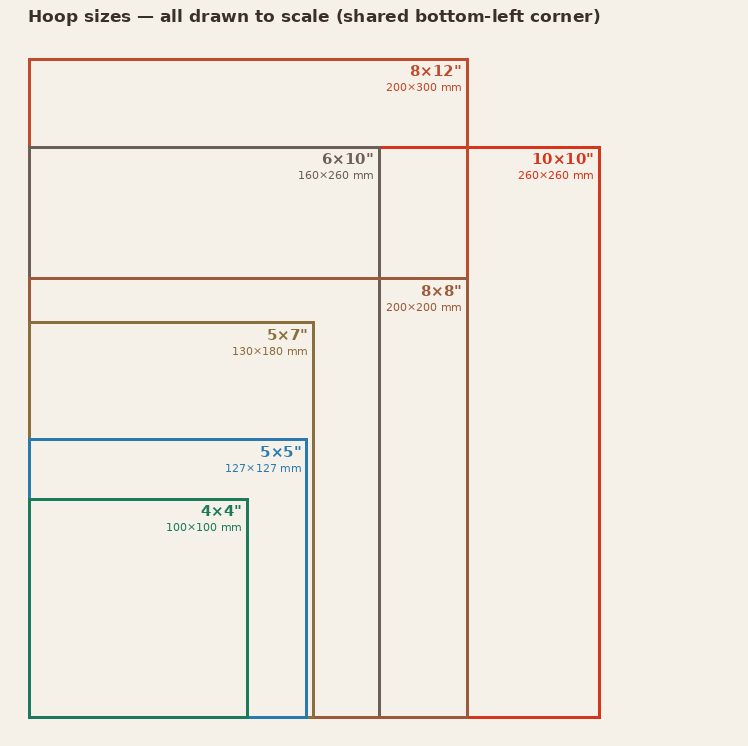
Set the hoop in the Document panel. Pick the hoop that matches your machine (or a smaller one) — here are all seven, drawn to scale so you can see how they compare:
| Hoop | Size |
|---|---|
| 4×4" | 100 × 100 mm |
| 5×5" | 127 × 127 mm |
| 5×7" | 130 × 180 mm |
| 6×10" | 160 × 260 mm |
| 8×8" | 200 × 200 mm |
| 8×12" | 200 × 300 mm |
| 10×10" | 260 × 260 mm |
There's also a No hoop option, which turns off the fit check entirely. If you choose a hoop and the design pokes outside it, bisect warns you before export and tells you which sides overflow and by how much.
Preflight
bisect continuously runs a preflight pass and surfaces issues in the right-side Preflight panel, and again right before you export:
- Hoop fit — if any part of the design extends past the active hoop, you get a warning naming the overflowing side(s) and the overage in millimetres.
- Stale preview — if you've edited since the last stitch generation, bisect reminds you to regenerate so the exported file matches what you see.
- Engine warnings — anything the stitch engine flagged while compiling (collected in the Preflight tab).
- Stitchability (text only) — font and size combinations that won't sew cleanly. The Stitchability inspector flags these and suggests a larger size or a different font.
Warnings don't block you — you can read them in the toast stack and Export anyway. If you've picked No hoop, the fit check is skipped.
If a design looks unexpectedly large or heavy, the usual culprits are:
- Shapes with very high density (stitch spacing set too low).
- Tatami fills with zero row offset, producing extra rows.
- Duplicated objects stacked on top of each other (check the Outliner for two of the same name).
- An outline set to satin on a long path that should have been running.
Transferring to the machine
Embroidery machines are surprisingly picky about USB sticks:
- Format the USB stick as FAT32, not exFAT. exFAT support is rare.
- Put the file at the root of the stick, not inside a folder.
- File names should be 8 characters or fewer, all ASCII, no spaces.
bisect names exports automatically (e.g. MYDESIGN.PES) and trims the name to a machine-safe 8-character base, but you can still rename in the save dialog.
Next step
Stuck on a format or a machine that won't read the file? See the FAQs.
See also: The editor · Drawing & stitch types · Keyboard shortcuts